7 years ago
Friday, August 29, 2008
Week 3 NSW Public Libraries Learning 2.0
How did you go using Flickr? I found it really slow on our network. I did do the adventure and added some photos. Naturally they are photos of my beautiful cat Batu. You can see them if you seach on "Batu on Balcony" and "Batu in safety gear". Plus I uploaded a couple of holiday snaps. There are some absolutely stunning photos of the Blue Mountains.
Tuesday, August 26, 2008
Handcuffed and charged for failing to return library books

Did you see this news story recently?
A Wisconsin woman has been arrested and booked for failing to pay her library fines. Heidi Dalibor, 20, told the News Graphic in Cedarburg, USA, she ignored the library's calls and letters as well as a notice to appear in court.
Still, she was surprised when officers with a warrant knocked on her door, cuffed her and took her to the police station to be fingerprinted and photographed.
Police Captain Joe Gabrish said officers follow the same procedure with every warrant.
Library director John Hanson said a couple of dozen people are cited each year for failure to return materials or pay fines.
The incident cost Dalibor about $30 for the overdue paperbacks White Oleander and Angels and Demons and her mother nearly $172 to get her out of custody.
A Wisconsin woman has been arrested and booked for failing to pay her library fines. Heidi Dalibor, 20, told the News Graphic in Cedarburg, USA, she ignored the library's calls and letters as well as a notice to appear in court.
Still, she was surprised when officers with a warrant knocked on her door, cuffed her and took her to the police station to be fingerprinted and photographed.
Police Captain Joe Gabrish said officers follow the same procedure with every warrant.
Library director John Hanson said a couple of dozen people are cited each year for failure to return materials or pay fines.
The incident cost Dalibor about $30 for the overdue paperbacks White Oleander and Angels and Demons and her mother nearly $172 to get her out of custody.
Friday, August 22, 2008
Week 4 RSS
1. What do you like about RSS and newsreaders?
I like the way the info comes to you, which is good in theory but needs to be used with care to avoid information overload.
2. What sites did you select for your RSS reader?
Originally I just clicked on a lot of news feeds and the PhM picture of the day. It was eye opening to realise that some people would actually want two rugby league feeds, two rugby union, two soccer, three cricket and four sport feeds - just in case one missed anything, all to one's desk top, like all the time!
3. How do you think you might be able to use this technology in your work?
I think it's another useful tool to know about, it seems to be an essential part of blogs and it's even on my flickr site.
4. How can libraries use RSS or take advantage of this new technology?
We can provide updates from our readers' advice blog.
5. Did you find any good examples of other library blogs?
Yes and I added some to by blogs eg Yarra Plenty Local Studies blog and I admire the Sutherland Library blog with it's page tabs, but the html is proving just a little difficult at this stage!
I like the way the info comes to you, which is good in theory but needs to be used with care to avoid information overload.
2. What sites did you select for your RSS reader?
Originally I just clicked on a lot of news feeds and the PhM picture of the day. It was eye opening to realise that some people would actually want two rugby league feeds, two rugby union, two soccer, three cricket and four sport feeds - just in case one missed anything, all to one's desk top, like all the time!
3. How do you think you might be able to use this technology in your work?
I think it's another useful tool to know about, it seems to be an essential part of blogs and it's even on my flickr site.
4. How can libraries use RSS or take advantage of this new technology?
We can provide updates from our readers' advice blog.
5. Did you find any good examples of other library blogs?
Yes and I added some to by blogs eg Yarra Plenty Local Studies blog and I admire the Sutherland Library blog with it's page tabs, but the html is proving just a little difficult at this stage!
Week 2 - Blogging
I just wanted to say how much fun I have had reading my blog evryday. I love hearing your comments. Plus, looking at all the new staff blogs has been great. Thank you to those who have sent me their blog link so I have been able to attach it to this blog. I think it will be good for all of us to have a central point to go and look at each others trials and tribulations on this great 2.0 journey!
I have also been very impressed with the calibre of blogs that are out there in Library Land. Lets bring the best bits back and add them to ours!
I have also been very impressed with the calibre of blogs that are out there in Library Land. Lets bring the best bits back and add them to ours!
Wednesday, August 20, 2008
Adding your blog toyour blog's blog roll
OK, so I got the last bit wrong. I thought everyone could see the same as me.
Most of you won't be able to add your blog to Vicki's blog roll BUT you can use the instructions to add one to your own blog roll.
All you'll need to do is go into Customize in your blog and click on the Layout tab. In the sidebar click on Add a gadget. You then get a list of the types of gadgets you can add. Look for Blog roll. Select it.
Then you click on Edit in the gadget you've just made. You can change its name and start adding blogs as per the previous instructions.
By the way, you can rearrange the order of the gadgets in your sidebar - just click on one and drag it to where you want it then let go.
Most of you won't be able to add your blog to Vicki's blog roll BUT you can use the instructions to add one to your own blog roll.
All you'll need to do is go into Customize in your blog and click on the Layout tab. In the sidebar click on Add a gadget. You then get a list of the types of gadgets you can add. Look for Blog roll. Select it.
Then you click on Edit in the gadget you've just made. You can change its name and start adding blogs as per the previous instructions.
By the way, you can rearrange the order of the gadgets in your sidebar - just click on one and drag it to where you want it then let go.
Adding your blog to the BM Library blog roll
In week 2 of Learning 2.0 Vicki has asked that we post our newly created blogs in the Blue Mountains Library Manager's Blog - this one. The blog roll is located on the right hand side of the blog, between Staff Tools and Interesting Websites.
Here's some instructions on how to do that.
First you need to be signed in to blogger.
Open the BM Library Manager blog using the Layout tab, or you can click on the crossed spanner and screwdriver icon below the blog roll area (illustrated below). If you go to the layout area, click on the Edit link in the BM Staff Library blogs section.
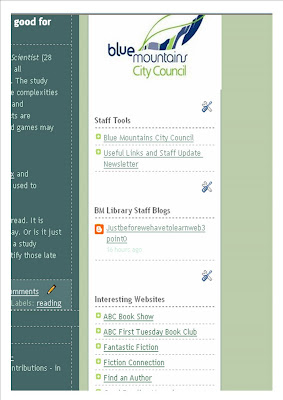 The following illustration shows you the window that opens. You will be able to see all the other blogs that are in the blog roll. To add a blog, click on Add to List.
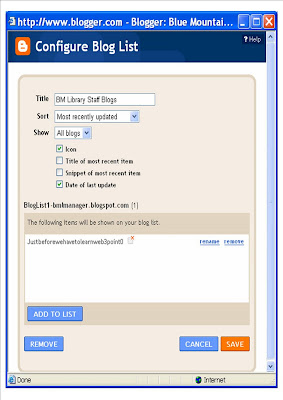
Another little window opens. Enter your blog's URL (web address) in the box provided and click on Add. Now click on Save in the Configure Blog List window.
 If you've gone in to the Layout area you will need to click on the Save button at the top of the Layout window to save all the changes.
Here's some instructions on how to do that.
First you need to be signed in to blogger.
Open the BM Library Manager blog using the Layout tab, or you can click on the crossed spanner and screwdriver icon below the blog roll area (illustrated below). If you go to the layout area, click on the Edit link in the BM Staff Library blogs section.
 The following illustration shows you the window that opens. You will be able to see all the other blogs that are in the blog roll. To add a blog, click on Add to List.
Another little window opens. Enter your blog's URL (web address) in the box provided and click on Add. Now click on Save in the Configure Blog List window.
 If you've gone in to the Layout area you will need to click on the Save button at the top of the Layout window to save all the changes.
That's all there is to it. Your blog should now be added to the blog roll. You can call me if you get stuck.
Heidi
Tuesday, August 19, 2008
Handy info
Can I suggest that you have a look here : http://www.blogger.com/features for some handy info on how to do stuff in Blogger. Starting at the beginning and getting more adventurous.
Subscribe to:
Comments (Atom)


 Posts
Posts